Fullbench

How it works

You make four decisions. We do everything in between.

Your office sends the need, chooses the candidate, approves the documents and approves the hours. Between those decisions Fullbench does the coordination: every approved agency at once, every required document collected and checked, every approved hour on one invoice. Every screen below is the one your office would use.

  • One contract
  • One invoice
  • One record
  • One contact
  • $0 program fee
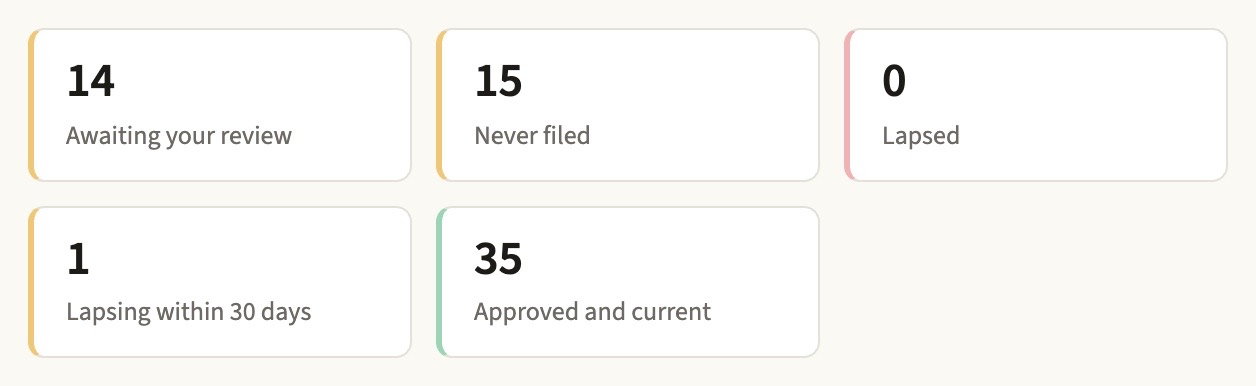
The district's credential summary: documents awaiting review, never filed, lapsed, lapsing within thirty days, and approved and current
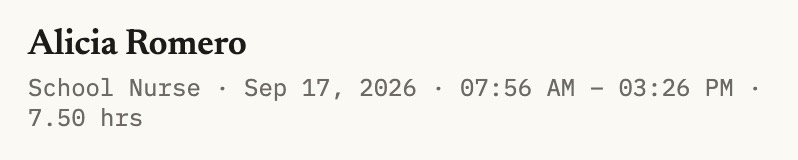
A timesheet waiting on the school: the worker, the role, the date, the hours, and the decision to approve or send it back
Two of the four steps: every required document accounted for, and the hours that become the invoice.Every required document accounted for, by status.

You send us the need.

You send the role, the school, the dates, and your ceiling rate to your Fullbench contact, by phone, by message, or typed into the district portal. That is the whole request. Nobody in your office calls an agency, and nobody learns a system to start.

We release it to every approved agency at once.

We release your opening to every approved agency the same minute, so the whole bench is working it instead of one agency at a time. We chase the submissions, the interview times, and the no-shows. Candidates reach you in one list, in the order they arrived, and every agency is measured from the same release.

Your office approves the candidate and the file.

Your office interviews and chooses; no agency can move its own candidate. Agencies upload each document and your office approves them item by item. Nobody starts in a building on a file your office has not approved: the program holds the start date until it has, and warns you and the agency thirty days before a clearance lapses.

You pay one invoice.

You pay one invoice for every agency. Everyone placed through the program clocks in on one system, and your schools approve the hours; a sheet sent back is not billed. Only approved hours reach the invoice, itemized by agency, person, role, and site at the rates you set. One payment from your business office.

See the invoice your business office receives →

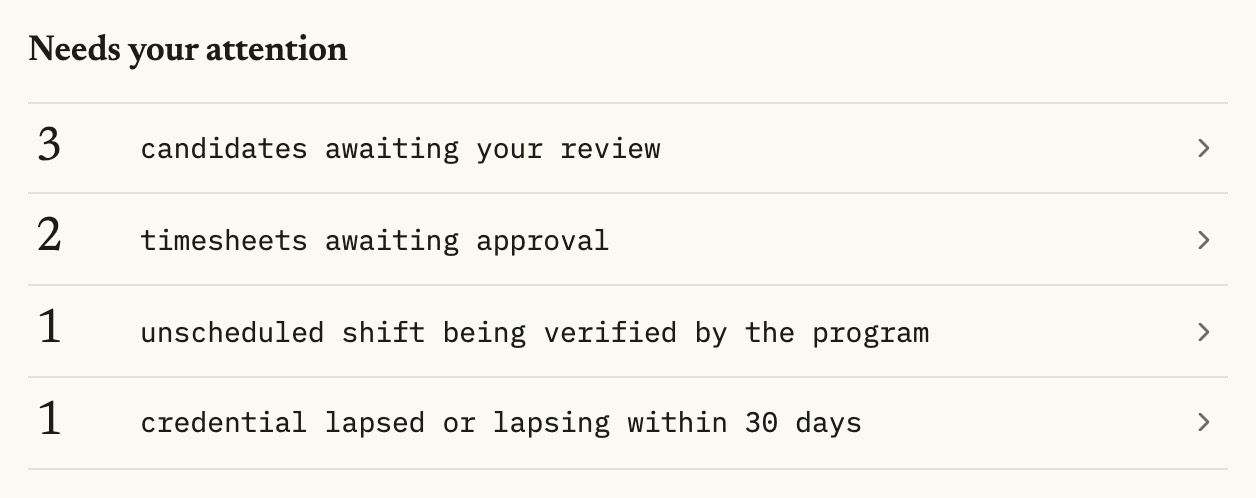
The district overview: three candidates awaiting review, a timesheet awaiting approval, an unscheduled shift being verified by the program, and a credential lapsing within thirty days
The district's home screen. Open requisitions, what is waiting on you, and nothing else.
The program record: a requisition released to two agencies at one recorded instant, with the name of the district administrator who released it, alongside the submissions that followed
One release, one recorded instant. Every approved agency saw this opening at the same second, and the record carries the name of whoever released it.
The district's credential summary: two awaiting review, thirty-one never filed, none lapsed, one lapsing within thirty days, and fifteen approved and current
Every clearance, by person. What is awaiting your review, what was never filed, and what is about to lapse, with the document one click away.
A timesheet waiting on the district: Alicia Romero, School Nurse, with the date, the hours worked and the choice to approve it or send it back for correction
Where the invoice comes from. One clock for every agency's people. Your schools approve each sheet before it becomes a line.

What the record shows you

Every decision, with a name and a time on it.

Every release, submission, document approval, start date, and timesheet decision is recorded as it happens, with who did it and when. Filter it by person, by date, or by kind of event. Export it any time; it is yours.

  • Rates and spend, by agency and by school, on one screen.
  • Who is in your buildings today, and on which file.
  • The answer for a board meeting, quoted from the record instead of rebuilt from email.
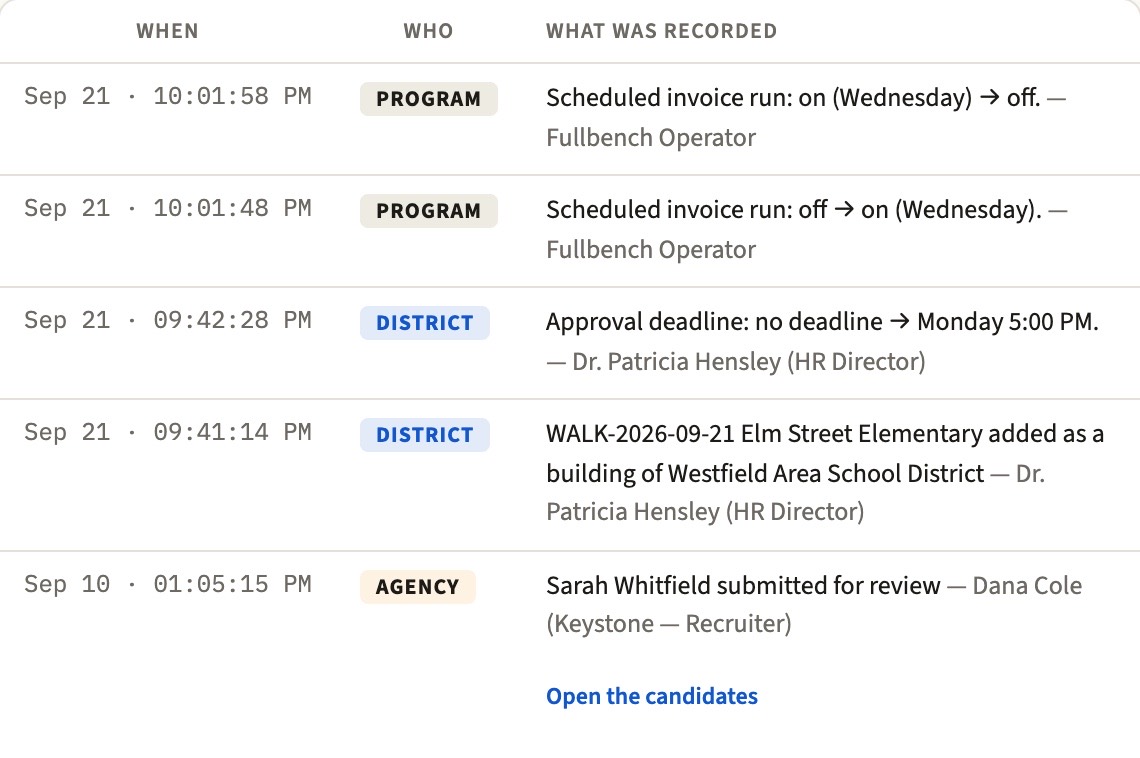
Three lines from the program record: a candidate submitted for review, a requisition released to two agencies at one recorded instant, and a stage change, each stamped with who did it and when
The record. Every decision in order, with who made it and when. Export it whenever you ask.

Questions

Common questions

How is fairness between agencies enforced?

It's recorded, not promised: one recorded release instant for every agency, district-driven statuses (agencies can't advance their own candidates), credential gates — and a timestamp with a name on every release, submission, and credential decision.

Do we have to replace our ERP or payroll?

No. Fullbench runs the staffing loop — the request, the candidates, the credential file, the hours and the invoice — alongside the systems you already have. Nothing to install, nothing to migrate, and your program record exports in full whenever you ask.

How does Fullbench handle credential compliance?

Compliance is a gate on the start date, not a reminder after the fact. Agencies upload each candidate’s documents — background checks, fingerprint clearances, licensure — and your office approves them item by item. The software cannot set a start date while anything is missing or awaiting review, and never against a document past its expiry. For people already working, a daily check re-asks that question and emails the district and the agency 30 days before a clearance lapses. The gate enforces the documents your district requires, each reviewed and approved by your office.

Who employs the worker — and who carries the liability?

The agency stays responsible for engaging the person it supplies, on the basis it uses today: payroll and employment obligations for the people it employs, or its own contract terms where a related-services professional works that way. Coordinating the work through Fullbench does not change it. The district supervises the work; the platform administers the workflow between them. Nothing about your co-employment posture changes.

All questions

Next step

The next question is always the money. It is a short answer.